¶ Sales Order Transaction Form Configuration
BlueCollar comes with a Sales Order transaction form pre-configured but the following are some best practices for setting up and configuring Sale Order transaction forms as Contracts:
-
Required Header Fields:
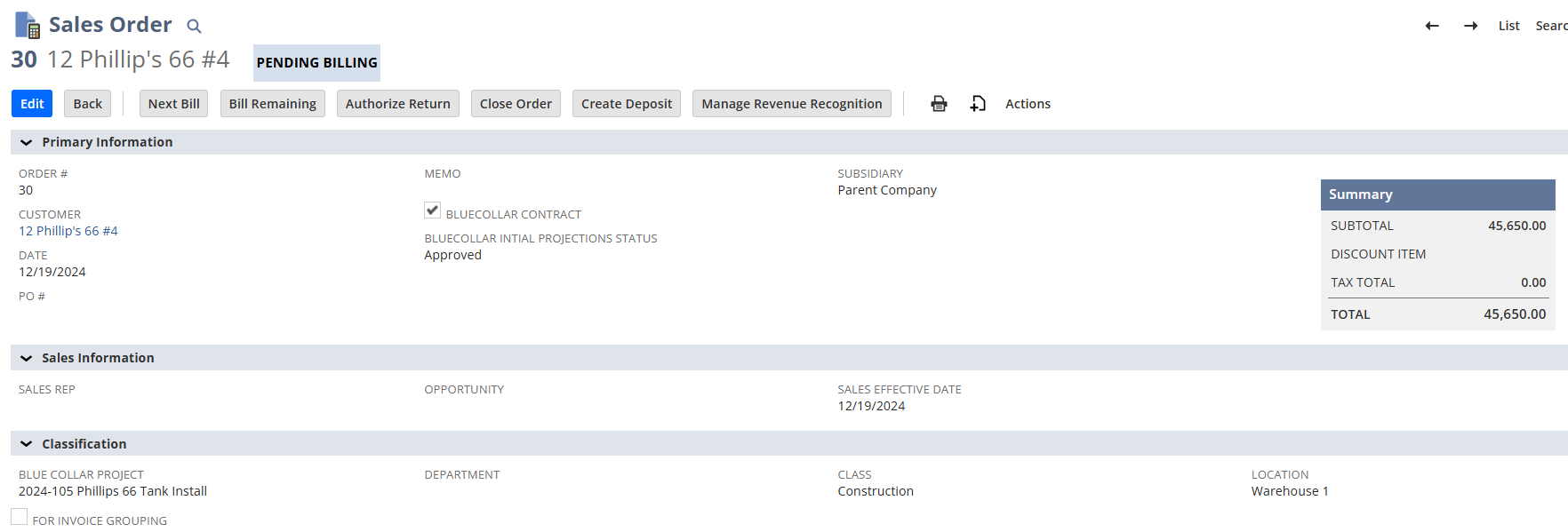
- BlueCollar Contract {custbody_bc_is_bluecollar_contract}: This checkbox is how BlueCollar distinguishes between a Contract a Sales Order that might have other purposes, e.g. maybe a non-construction part of the business where parts are sold retail.
- BlueCollar Initial Projections Status {custbody_bc_contract_status_f}: This field is required to be exposed but is updated as Revenue Projections are initially updated.
- BlueCollar Project {cseg_bc_project}: The BlueCollar Project segment is required in the header of the form and hidden in the rows. The reason for this is because each Contract can only belong to one Project.
-
Required Column Fields:
- Line # {custcol_bc_proj_line_num}: This is field is required to have an integer for each row.
- Original Line Value {custcol_bc_proj_org_value}: When a Contract is initially set up the amounts entered into the native 'Amount' column will populate here upon saving. Note: Once a line has an invoice or a billing change request, it can no longer be updated directly through the Sales Order and must instead be updated through the Change Order Process. Only Retention % and Units stay editable on such lines (see Form Design Notes below).
- Original Units {custcol_bc_proj_org_units}: Like Original Line Value, Original Units is automatically populated based on the values entered in the native Quantity field upon saving the SO. Any subsequent updates should be handled through the change order process.
- Retention % {custcol_bc_retentions_percentage}: This field defines the initial retainage % agreed upon for each line on the schedule of values (Contract). It can be adjusted later, even on invoiced lines.
Additional fields can be added as needed. Here is what a typical Contract Sales Order form should look like:

¶ Form Design Notes
- The BlueCollar Project segment belongs in the header only and should be hidden in the line items — each contract belongs to a single project.
- Original Line Value and Original Units are set automatically on the first save and serve as the immutable baseline. After a line is invoiced, change them only through the Change Order process.
- Editing lines after billing starts. Once a line has an invoice or a billing change request against it, the Sales Order form locks Item, Line #, Rate, Quantity, Amount, Original Units and Original Line Value. Trying to change any of them shows "Cannot Update The Line … Any change must be done by creating a Change Request." Two fields stay editable on those lines: Retention % and Units (the unit of measure). This is useful when a retainage rate is renegotiated mid-job, or a wrong unit of measure is caught after the first pay application, because you can correct it in place without a Change Order.
- Additional custom fields can be added to the form for organization-specific needs.
For information on how this form may differ from Sales Order transaction forms configured for T&M Billing, see Time and Materials Billing.