¶ Contract / Revenue Projections
Contract Projections (also called Revenue Projections — used interchangeably) are the contractor's best estimate of what each contract line will ultimately bill out at. They are separate from Current Contract values (Original Contract + approved Change Orders) and they drive Revenue Recognition and (Over)/Under billing calculations, so it's important to keep them up to date.
It's useful to separate the two: in many industries, contract values represent the formal agreement with the owner but not the contractor's actual best guess at what completion will look like. A common example is Department of Transportation work, where SOV lines carry DOT-estimated unit quantities that often differ substantially from what's actually installed. Projections let the contractor express the realistic completion picture — which drives billing — without forcing a change order against the agreed contract.
¶ How Projections Work by Default
By default, every contract line's projected values equal its current contract values. When a Sales Order is saved as a Contract, projections are populated automatically from the contract itself — no approval step, no separate setup. The Current Contract is the projected contract until you change it. Brand-new contracts show meaningful projections out of the box and revenue recognition starts working immediately.
You override projections only when your best estimate diverges from the contract — for example, when you expect to install more or fewer units than the contract says, or when you're projecting a loss on a specific lump-sum line.
¶ Editing Projections in the Contract UI
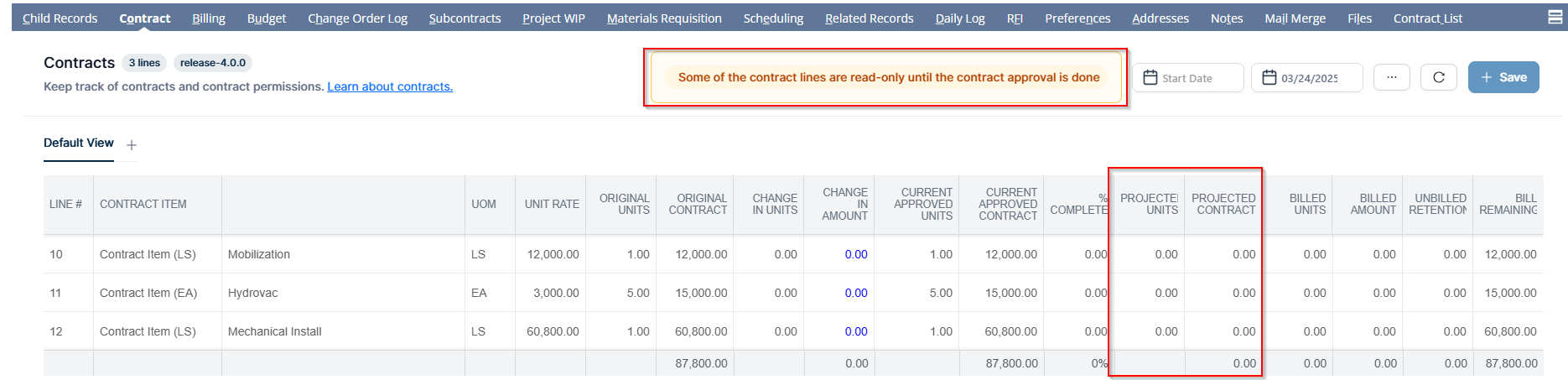
Projections are edited directly in the Contract UI on the project's Contract tab. Projected Units and Projected Contract are editable columns. You can adjust any line's projection at any time and save your changes.
¶ Set Contract Projections in One Click
The Contract UI header's options (⋯) menu includes a Set Contract Projections action. Choosing it sets the Projected Units and Projected Contract for every line equal to that line's Current Approved Units and Current Approved Contract in a single step — then you save. It's a quick way to bring projections back in line with the current contract (for example, after change orders have shifted current contract values), after which you can fine-tune individual lines as needed.
¶ Projections on Change Orders
When a Change Order is approved, by default it also updates the projected values for the affected lines — keeping projections in lockstep with the new current contract. This is what most teams want: the approved scope change is also the new best estimate, so revenue recognition and the over/under reflect it immediately.
If you'd rather the change order leave projections untouched — so projections stay tied to whatever was previously projected — uncheck the "Update Contract Projections" box on the BlueCollar Change Request form before submitting the change. Use this when:
- The change order represents a contractual / agreed-with-owner change, but your best estimate of completion isn't changing (for example, an internal scope shuffle that doesn't move final dollars).
- You manage projections separately from the contract and don't want change orders touching them automatically.
Either way, you can always reset projections back to the current contract at any time using Set Contract Projections.
¶ Keeping Projections Current
A few things to keep in mind as you maintain projections:
- Projected Units and Projected Contract are edited directly in the Contract UI; their grid columns are editable.
- Alongside projections, the grid surfaces Billed Units, Billed Amount, and Unbilled Retentions so you can see how billing is progressing against each line.
- Change orders update projections by default — see the section above to opt out per change order.
¶ Projection Editing Rules
- Lump Sum lines: the Projected Units field isn't editable — you edit only the Projected Contract amount. Negative projected dollars are allowed on lump-sum lines (to project a loss on a specific line).
- Unit Price lines: both Projected Units and Projected Contract are editable. Editing units recalculates the projected contract as
unit rate × projected units; editing the projected contract recalculates units asprojected contract ÷ unit rate. Negative or sub-$1 Projected Contract values are accepted on these lines, which is useful when you are projecting a loss or a credit on a unit-price line. - Negative projected units are rejected; zero is allowed.
¶ Language Support
The Contract UI and the Contracts Center are available in English and French, following your NetSuite language preference.
For how projections flow into earned revenue and the over/under position, see Revenue Recognition and WIP.
¶ Legacy: Initial Projection Approval Workflow
Deprecated. This workflow applies to older releases. Current behavior: the Current Contract value is the projected contract value by default — there is no "Approve Initial Projections" button. The content below is kept for customers still on the previous flow.
On older releases, when a Sales Order was first created as a Contract, the Initial Projection Status was set to Pending Approval and an Approve Initial Projections button appeared at the top of the Sales Order form:
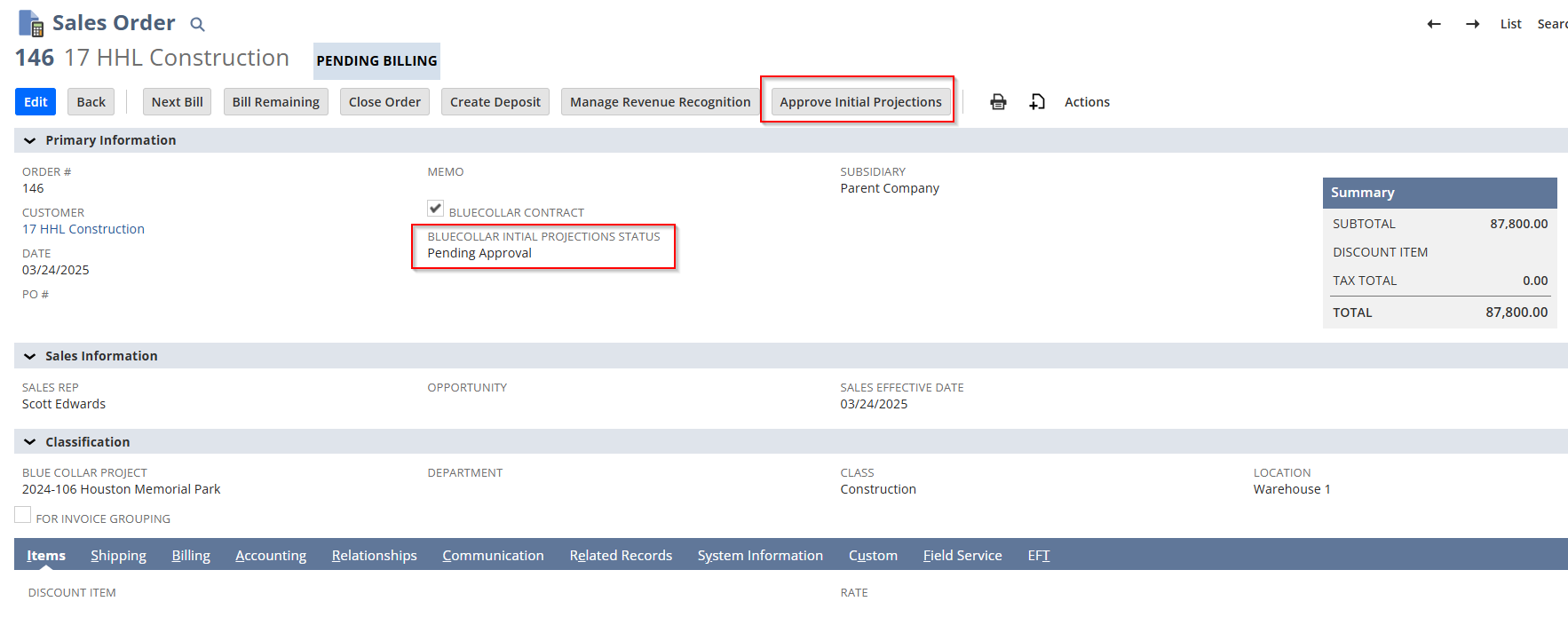
Approving the initial projections created the underlying revenue projection records that fed revenue recognition. This approval step gave users a chance to review and adjust lines before those projection records were created. Approvals could be done one contract at a time from the Sales Order, or in bulk from the Contracts Center.
¶ Approving Initial Contract Projections from the Contracts Center (Legacy)
Rather than approving one contract at a time, users could navigate to BlueCollar → Contracts → Contracts Center to approve initial projections across many contracts at once:

The Contracts Center showed contract number, date, transaction number, current contract value, approval status, project, customer, and subsidiary, with a Subsidiary filter that respected the user's role access. To approve in bulk: select one or more contracts, click Approve, and confirm. Approvals processed in batches of up to 25 at a time.
If you're on the current release and still see this workflow, contact BlueCollar Support — there's likely a global preference left over from a prior upgrade.