¶ Chart of Accounts Setup:
- Before any configuration occurs, be sure that the chart of accounts is set up. Accounts can be added as needed when going through configuration, but most required information revolves around default GL Accounts.
¶ Designating Accounts as Cost Types and Budgetable Cost Types
- In BlueCollar Projects, GL Accounts are Cost Types. In many legacy construction systems Cost Types are part of a subledger system that map to GL Accounts. Because NetSuite does not have subledgers there is no need to map another record like a Cost Type to the GL. This allows Project detail to always be in sync with the financials.
- Typical examples of Cost Types are Labor, Equipment, Materials, Consumables, Subcontract, etc. These basic GL accounts are combined with Cost Codes to create powerful reporting combinations while simplifying the coding of transactions and the complexity of a chart of accounts.
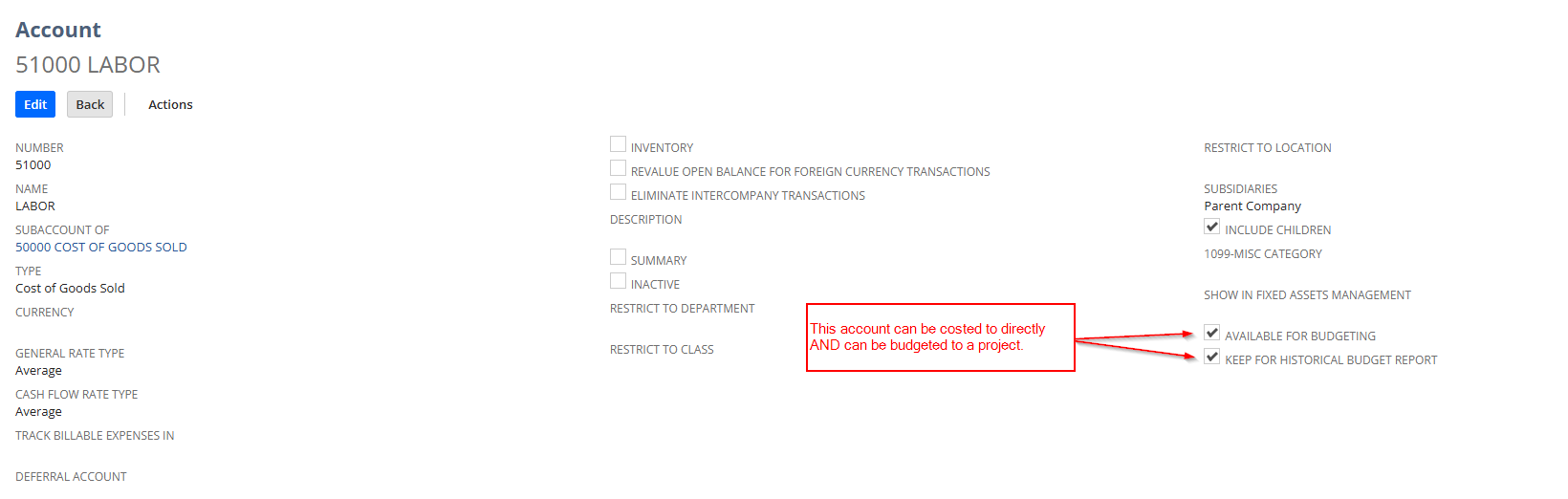
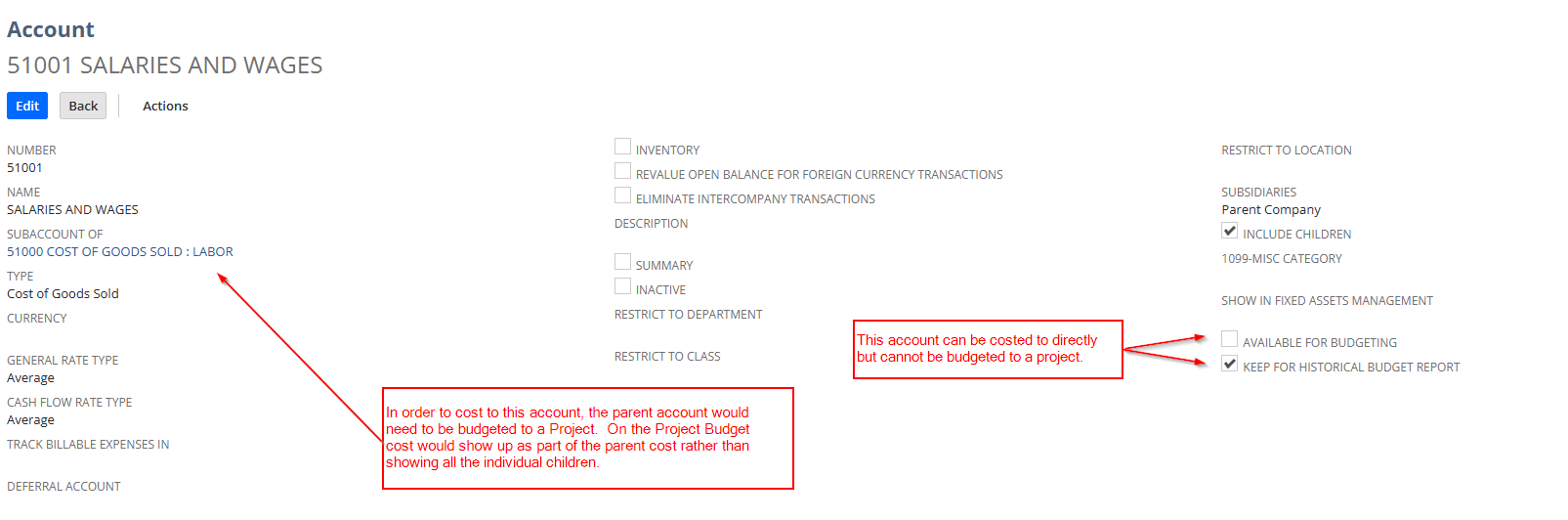
- GL Accounts can be designated as Cost Types in two main ways. First, users can designate accounts as being 'Available for Budgeting'. If an account does not have this check box checked then users will not be able to add this account to Project Budgets. Secondly, there is a checkbox on the Account record called 'Keep for Historical Budget Report'. This box allows cost to be applied to a project and this account as long as there is a parent account that is budgeted to that Cost Code.
See Below for Details
¶ Account Hierarchies for Job Costing
-
In NetSuite accounts can be hierarchical. BlueCollar users are able to designate parent accounts as cost types in order to budget and forecast for those accounts but then transact against child accounts. A common example and use case for this is payroll journals from a 3rd party payroll provider against a project. Typically these journals have many COGS accounts such as Wages, Employer Paid Tax, Benefits Expenses, Insurance, etc. With BlueCollar, users are able to budget and forecast using just a parent labor account while not losing the detail of the particular expenses of the journal or going through manual scrubbing of the accounts coming in from an outside payroll provider.
-
When using account hierarchies for job costing, either ONLY the parent should be budgeted OR only the children should be budgeted. Both parent and child should never be budgeted or else job cost will appear doubled in the project reporting since parent accounts assume that they should sum all child account activity as well.
¶ Examples of Designating Accounts as Cost Types and Budgetable Cost Types
- From a role with Account permissions, navigate to Lists > Accounting > Accounts
- Select “Edit” for the account you wish to budget against
- To make an account available for budgeting Select (Check) the 'AVAILABLE FOR BUDGETING’ field on the account and click save.
- When you click save, the 'KEEP FOR HISTORICAL BUDGET REPORT' check box will automatically be checked.
- To make a child account available for costing as long as a parent account is budgeted, Select (Check) the 'KEEP FOR HISTORICAL BUDGET REPORT' field only.
- When you click save, the 'KEEP FOR HISTORICAL BUDGET REPORT' check box will automatically be checked.
Setup of an account that can be budgeted for:
Setup of an account that cannot be budgeted for but can be costed against:
¶ Job Cost Report Considerations
- Note that in both uses of defining Cost Types, the 'KEEP FOR HISTORICAL BUDGET REPORT' box is always checked. This criteria is the best way to define job cost on any BlueCollar reports since users are able to budget for and cost againt various account types, i.e. Inventory, Asset, COGS, Expense, etc.