¶ BlueCollar Preferences:
- BlueCollar has Global Preferences that will impact how your account functions.
- From an Administrator role, navigate to BlueCollar > Preferences > Global Preferences
- Select “Edit” on the Configuration Record
- Update Preferences based on your requirements.
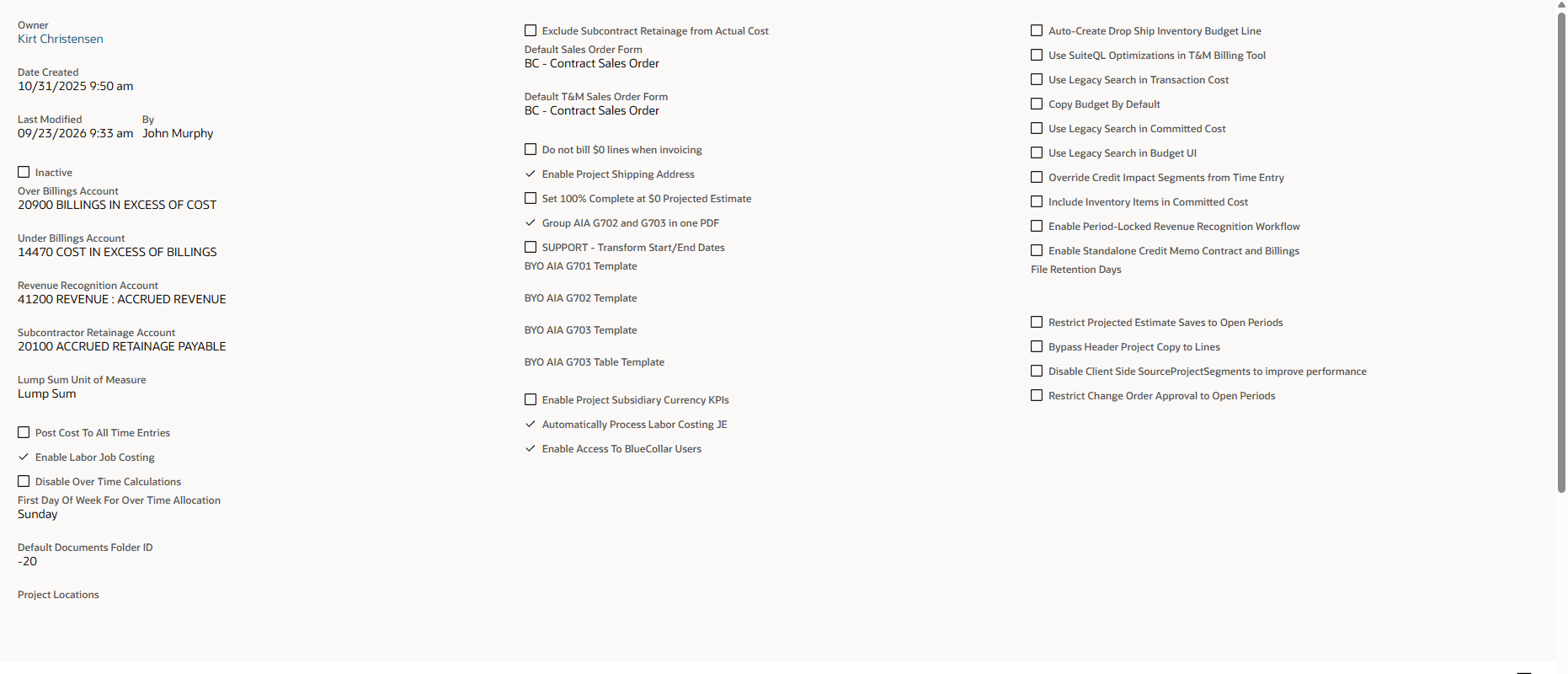
The BlueCollar Global Preferences record. The six options added in Release 15.2 sit at the end of the right-hand column.
| Setting | Description |
| OVER BILLINGS ACCOUNT | Only Needed if using the BlueCollar Revenue Recognition Feature. Account to ensure proper Revenue Recognition, if Billed Revenue (billings net of retainage) exceeds Earned Revenue (Contract Revenue earned in proportion to % of cost complete) the excess is a liability that gets posted to the account selected here. This account will be 0 upon project completion. Note: The deficit will check the Over Billing account and ensure the proper balance is maintained. A balance will only exist in the Overbillings Account or Underbilling’s Account per project, never both. The Over Billings Account and Under Billings Account must be two different accounts. If the same account is selected in both fields, the record will not save and shows the error "Over Billings Account and Under Billings Account cannot be the same". |
| UNDER BILLINGS ACCOUNT | Only Needed if using the BlueCollar Revenue Recognition Feature. Account to ensure proper Revenue Recognition, if Earned Revenue (Contract Revenue earned in proportion to % of cost complete) exceeds Billed Revenue (billings net of retainage) the excess is an asset that gets posted to the account selected here. This account will be 0 upon project completion. Note: The deficit will check the Under Billing account and ensure the proper balance is maintained. A balance will only exist in the Overbillings Account or Underbilling’s Account per project, never both. This account must differ from the Over Billings Account. Selecting the same account in both fields blocks the save with the error "Over Billings Account and Under Billings Account cannot be the same". |
| REVENUE RECOGNITION ACCOUNT | Only Needed if using the BlueCollar Revenue Recognition Feature. Define the account you want to credit when running revenue recognition journals. Frequently an account is designated specifically for this purpose as an ‘accrued revenue’ account. The benefit of having this type of account is the ability to see what Over/Under Billings is based on the balance of this account – if negative then you’re over billed; if positive then you’re under billed. |
| SUBCONTRACTOR RETAINAGE ACCOUNT | If an account has the Subcontract Management module enabled then this account can be used to define the credit impact of Subcontract Retainage withheld from Subcontractor Invoices. |
| LUMP SUM UNIT OF MEASURE | This maps to base UOM in NetSuite, it impacts how billing amount is calculated when the Quantity is set (The quantity is treated as a % for a Lump Sum (LS) UOM, it’s treated as a Unit for all other UOMs) Note: Change Order to lump sum UOM is total dollar, if non-Lump Sum, the Qty is changed (rate stays the same) Defining the Unit of Measure that is understood by BlueCollar to be Lump Sum will impact the way that various controls and user interfaces react to user inputs. For example, if a line on a contract is a lump sum unit of measure, then projections are not allowed in the unit's field; billing is understood to be % billed when entered as a whole number in the billing UI; and Changing Units through the change order process is not allowed. Conversely, non-lump sum unit of measure items are able to be projected by the unit; billed by the unit (as opposed to %); and change orders to update unit quantities is allowed. |
| DEFAULT DOCUMENTS FOLDER ID | Internal Use Only |
| RENDER BUDGET APP | Internal Use Only |
| RENDER BILLING APP | Internal Use Only |
| RENDER CONTRACT APP | Internal Use Only |
| RENDER REVENUE WIP APP | Internal Use Only |
| RENDER CHANGE REQUEST FORM APP | Internal Use Only |
| RENDER CHANGE REQUEST LIST APP | Internal Use Only |
| RENDER SCHEDULING APP | Internal Use Only |
| RENDER MATERIALS APP | Internal Use Only |
| RENDER SUBCONTRACT LIST UI | Internal Use Only |
| RENDER SUBCONTRACT BILLING UI | Internal Use Only |
| ENABLE LABOR JOB COSTING | This box can be checked to enable standard project labor costing. Reach out to your BlueCollar representative for more information. |
| POST COST TO ALL TIME ENTRIES | When this feature is enabled, amounts are posted across all employees with rate templates associated regardless of whether they were coded to a BlueCollar Project or not. If left unchecked journals will be created for BlueCollar projects only. |
| FIRST DAY OF THE WEEK FOR OVERTIME CALCULATION | In order to calculate OT/DT a first day of the week must be defined. |
| PROJECT LOCATIONS | This is used for T&M Billing Inventory rules. Inventory Items received from a Transfer Order to a Project Location defined in this list are able to be matched against T&M Billing Material rules. |
| EXCLUDE CONTRACT RETAINAGE FROM ACTUAL COST | For certain users such as developers who are submitting draw requests to banks, etc. Because they are submitting requests for funds to cover real expenses, they don’t have a need to view retainage payable as an expense that immediately needs cash to cover. This option doesn’t count Subcontract Retainage in Actual Cost for this purpose. |
| DO NOT BILL $0 LINES WHEN INVOICING | By default NetSuite and BlueCollar will include all lines from the SO on Invoices. This option may be useful if mistakes are made frequently such as billing the wrong line or meaning to bill a line and not doing so, since if the line doesn’t exist on the Invoice it can’t be edited. To include ONLY lines that are billed, select this option. |
| ENABLE PROJECT SHIPPING ADDRESS | When this option is selected addresses designated as “Default Ship-To” in a Project Address list will be populated on all SOs related to the project. |
| SET 100% COMPLETE AT $0 PROJECTED ESTIMATE | Some users have projects that have revenue but no cost. If a project has no projected estimate, then by default it will be understood as 0% complete. When this option is enabled however, a $0 projected estimate is understood as being 100% complete. |
| GROUP AIA G702 AND G703 IN ONE PDF | When this option is enabled G702 and G703 AIA docs print as one PDF on the Invoice record. |
| DEFAULT CONTRACT FORM | The Sales Order form that defaults when the Create Contract button is selected from a Project record. Use this to point the Create Contract action at your BlueCollar contract form. |
| DEFAULT SALES ORDER FORM | The Sales Order form that defaults when users create Sales Orders from the T&M Billing screen. |
| USE SUITEQL OPTIMIZATIONS IN T&M BILLING TOOL | Off by default. When checked, the T&M Billing screen fetches its rows with a SQL query instead of a saved search, which is faster on large accounts. |
| DISABLE OVER TIME CALCULATIONS | When checked, BlueCollar does not run OT/DT calculations. Use this when a customer does not need overtime/double-time cost allocation. (When overtime is being calculated, set the FIRST DAY OF THE WEEK FOR OVERTIME CALCULATION above so the work week is defined.) |
| AUTOMATICALLY PROCESS LABOR COSTING JE | When checked, labor costing journal entries are created automatically on a schedule rather than requiring the labor costing tool to be run manually. |
| INCLUDE INVENTORY ITEMS IN COMMITTED COST | When checked, inventory items on purchase orders tied to a project (including Special Order and Drop Ship purchase orders) count toward the project's committed cost. Received stocked inventory also shows as actual cost on the item's COGS budget line, so the Budget tab matches the WIP Report. On projects with Unlock Budget turned on (a checkbox on BlueCollar Project Advanced Preferences), purchase orders, item receipts, vendor bills and vendor credits for inventory or assembly items automatically create the missing Cost Code / COGS budget line at $0, provided the account is available for budgeting. |
| AUTO-CREATE DROP SHIP INVENTORY BUDGET LINE | When checked, a budget line is automatically created against dropship inventory committed cost so that drop-shipped inventory is reflected in the project budget. |
| OVERRIDE CREDIT SEGMENTS | When checked, the credit lines on the Resource Cost Journal (Department, Class, Location, and any custom segments) inherit their values from the related time entry. If the time entry does not have a value, the segment value from the Resource Rate Template is used instead. |
| COPY BUDGET BY DEFAULT | When checked, budget items are copied by default when a project is copied using the Project Copy operation. |
| ENABLE PROJECT SUBSIDIARY CURRENCY KPIS | Enables currency conversion for project KPIs when working in multi-subsidiary, multi-currency environments. Affects the WIP Report, Revenue Recognition, and Budget applications. |
| ENABLE (PERIOD-LOCKED) REVENUE RECOGNITION | When checked, the Revenue Recognition screen opens with the Through Date set to the last day of the current accounting period and the period filter pre-selected to match. Changing the Through Date snaps it to the last day of the period that contains the selected date, and the period filter follows. When you click Recognize, a confirmation dialog lets you edit the journal date before posting, and the journal's posting period follows the chosen date. Dates that fall in a closed accounting period are rejected with a clear message before any journals are created. When unchecked, the Through Date defaults to today and the period filter is independent. |
| BYO AIA G701 TEMPLATE | Upload your own branded AIA G701 (Change Order) document template to use in place of the BlueCollar default. |
| BYO AIA G702 TEMPLATE | Upload your own branded AIA G702 (Application and Certificate for Payment) template to use in place of the BlueCollar default. |
| BYO AIA G703 TEMPLATE | Upload your own branded AIA G703 (Continuation Sheet) template to use in place of the BlueCollar default. |
| BYO AIA G703 TABLE TEMPLATE | Upload your own template for the G703 table section to use in place of the BlueCollar default. |
| ENABLE STANDALONE CREDIT MEMO CONTRACT AND BILLINGS | Off by default. When checked, credit memos that are not linked to an invoice (Created From is empty) are counted at the project level in the WIP Report, the Revenue Recognition tool, the Billing screen and the Contract screen, where they appear as read-only rows. They reduce Billed to Date, Net Billed to Date, Unbilled Retentions, Open A/R, and the Current (Revised) and Projected Contract values of their project. Credit memos created from an invoice are not affected and continue to reduce billings only, and the Original Contract value never changes in either mode. Typical uses are T&M material returns, negative change orders on fully billed contracts, negotiated price reductions and owner back-charges. When unchecked, standalone credit memos stay out of the WIP Report, as in earlier releases. See Credit Memos. |
| FILE RETENTION DAYS | Blank by default. Whole number. Leave it blank (or 0) for no cleanup. Otherwise a daily BlueCollar cleanup job deletes temporary files older than this many days from the File Cabinet: projection mass-create CSVs and completed or in-progress project import files. Handy housekeeping for accounts that generate many temporary files. |
| RESTRICT PROJECTED ESTIMATE SAVES TO OPEN PERIODS | Off by default. When checked, a projected estimate cannot be saved with an effective date in a period that is closed for the project's subsidiary. The user is offered the next open period or can choose a different date. Users with NetSuite's Override Period Restrictions permission can still save. See Project Budget. |
| BYPASS HEADER PROJECT COPY TO LINES | Off by default. When checked, transaction lines keep the project and cost code the user entered instead of being changed to match the header Project. This applies account-wide, to every project, regardless of any BC Connector Preferences hierarchy setting. Use it when lines intentionally belong to a different project than the transaction header. |
| DISABLE CLIENT SIDE SOURCEPROJECTSEGMENTS TO IMPROVE PERFORMANCE | Off by default. When checked, BlueCollar stops filling Class, Department and Location from the BC Project while a transaction form is open (on page load and when the BC Project changes). On save, only segments that are still empty are filled in; existing values are neither overwritten nor cleared when they no longer match the project. Turn this on to speed up opening and editing large transactions. |
| RESTRICT CHANGE ORDER APPROVAL TO OPEN PERIODS | Off by default. When checked, a change order cannot be approved when its effective date falls in a period that is closed for the project's subsidiary. The approver sees the error "Approval period is closed" with the suggested next open period and must move the effective date to an open period first. Roles with NetSuite's Override Period Restrictions permission can still approve. See Change Orders. |