¶ Contract Creation
A BlueCollar Contract / Sales Order can be created through any native means. This includes creation from an Opportunity or from a Quote/Estimate. Additionally, a common flow is to create the Contract from the Project record that was created previously.
Regardless of the method used, what's important is that the required fields are exposed and filled out. See Sales Order / Contract Form Configuration for more information.
¶ Method 1 — From the Project Record (Recommended)
This is the recommended approach because it pre-fills project information for you.
- Open the BlueCollar Project record.
- Click Create Contract (disable browser pop-up blockers).
- A Sales Order form opens, pre-filled with the Project Name and Customer from the project.
- Enter the Schedule of Values line items — items, quantities, rates, and retention percentages.
- Save.
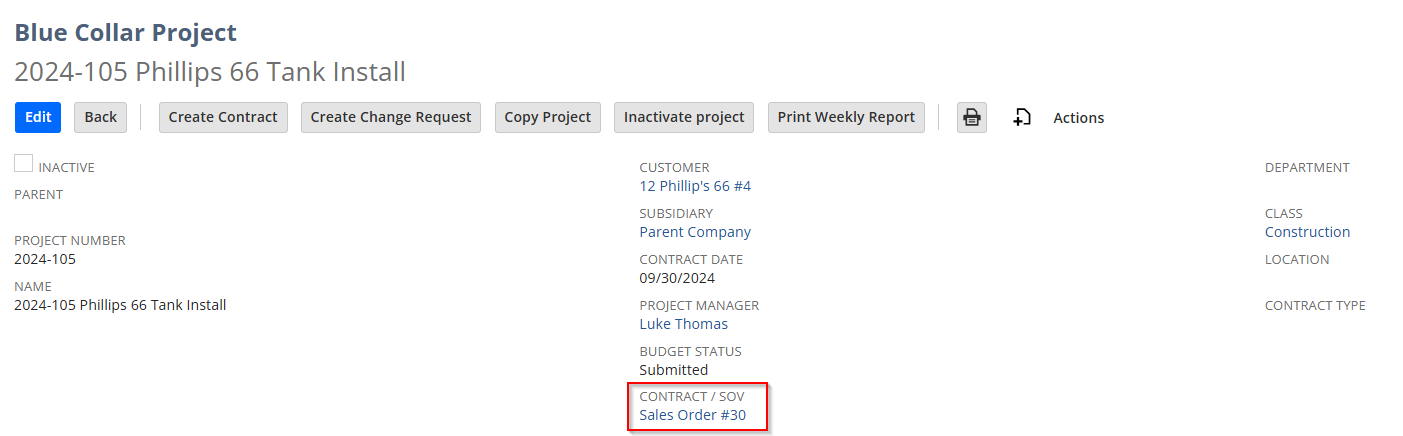
Once saved, the Contract is linked in the Contract / SOV field on the Project record:
¶ Method 2 — From an Opportunity or Quote/Estimate
Contracts can be created from an Opportunity or Quote through native NetSuite transformation flows. Just make sure the resulting Sales Order uses the correct Contract form and that all required BlueCollar fields are populated.
¶ Method 3 — Designate an Existing Sales Order
If a Sales Order already exists and isn't yet linked to a project, you can turn it into a Contract by checking the BlueCollar Contract checkbox, setting the BlueCollar Project field, and saving. The system then links the Sales Order to the Project just as it would on creation from the project record.
¶ Good to Know
Once a contract has related invoices or change requests, the system prevents reassigning it to a different project — doing so would break the financial relationships between billing history and the project. You'll see a message explaining that the assigned project can't be changed while related invoices or change requests exist.